

browser dimension, you can
see how Safari users behaved vs Chrome.
Be careful, the more dimensions and metrics you look at for an experiment, the more likely you are to see false positives -
something that looks significant when it really isn’t. For example, if you break out results by country, it’s pretty likely that at least one of the 100+
countries in your dataset will be significantly different just by random chance.
It’s best to treat dimensions as an exploratory tool and not something to directly draw conclusions from.
The two best use cases are identifying bugs (the browser example) and getting ideas for dedicated follow-up experiments.
Dimensions are supported for both Mixpanel and SQL data sources.
Custom dimensions
In addition to the dimensions you define, the dimension selector on experiment results has a Custom group with two dimensions you build on the fly. Neither requires any setup on your data source.First exposed after…
Pick a datetime (in UTC) within the experiment phase. Units are split into two slices based on whether they were first exposed to the experiment before or after that time. This is useful for checking whether a fix, release, or traffic change partway through the experiment affected results.Combination of dimensions
Pick two different dimensions (Experiment Dimensions or User Dimensions) and GrowthBook breaks results down by their intersection, with one slice per pair of values such ascountry: US & plan: premium. As with any dimension, only the top 20 slices are kept and the rest are grouped into (other). Because two dimensions multiply the number of slices, keep the number of values in each small to avoid the false positive issues discussed above.
Both are also available in the REST API when creating a snapshot: use cutoff:<ISO datetime> (e.g. cutoff:2026-01-15T00:12:00.000Z) or combo:<dimA>::<dimB> (e.g. combo:exp:country::dim_abc123) as the dimension.
SQL
There are two types of dimensions for SQL data sources: Experiment Dimensions and User Dimensions. Experiment dimensions are more reliable for producing unbiased experiment analyses because we can always know the dimension that is associated with the first experiment exposure for a unit. Using dimension data that could be affected by the experiment (e.g. that is collected after the first experiment exposure) could bias dimension drill-downs. Therefore, use user dimensions with caution, and we suggest using immutable dimensions as your user dimensions (e.g. the first client the user ever used, or the first country the user ever logged in from). For all experiment analyses, we only ever choose one dimension per user, to avoid the aforementioned issues with potential bias. For Experiment Dimensions, we select the dimension associated with the user’s first exposure event for the experiment. For User Dimensions, we strongly suggest only having one dimension value per user, as we cannot discern what dimension a user had before the experiment. Instead, we simply choose theMAX(value) for the user dimension.
Experiment Dimensions
These are attributes that are specific to the point-in-time that a user was put into an experiment. For example,browser or referrer.
Instead of a standalone SQL query, experiment dimensions are simply extra columns you return from the Experiment assignment query defined for your data source.
As an example, if you set the following as your experiment assignment query:
browser is a custom one that can be used as an Experiment Dimension.
Configuring Experiment Dimensions
To power the health tab and pre-computed dimension results, you need to configure your Experiment Dimensions. You can do this by clicking the “Configure Dimensions” button in the kebab menu next to the exposure query where the Experiment Dimensions are defined: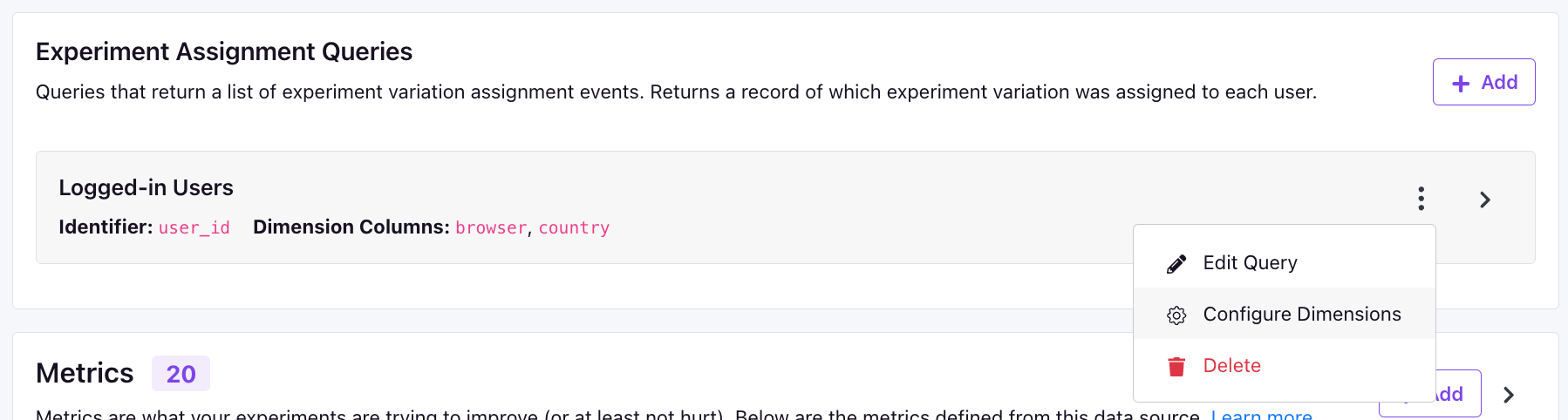
CASE statement that defines the dimension slices. For example, if you wanted to have a browser dimension with slices for Chrome, Safari, and Other, you could do something like this:
User Dimensions
These are attributes of your users that are relatively stable over time, and ideally, do not change over the course of an experiment. For example,cohort, initial age group, or first client used.
A user dimension is defined by a simple SQL query that returns two columns: an identifier and value. The name of the identifier column depends on which identifier type the dimension is using. Remember, when using these for analysis, we will pick the MAX(value) for each user, and therefore it is best to only have one value per user.
Here’s an example SQL using an immutable attribute (the user’s first country):
Time-aware dimensions
Some attributes change over time, such as a subscription plan. By default, GrowthBook ignores time and picks theMAX(value) per user, which can leak values a user only acquired after they were exposed to the experiment unless you follow our advice to filter to rows before the experiment start or use immutable dimensions.
For dimensions which do change over time, there is a Query returns setting on a dimension that tells GrowthBook how to resolve the value each user had at the moment of their first exposure:
When you save a dimension, GrowthBook runs the query against your warehouse to confirm it returns the columns the selected setting requires. Time-aware settings are only available on SQL Data Sources.
One value per unit fits attributes that never change (
first_country, signup_cohort), or attributes you pin to the experiment start yourself. Filtering to rows before {{ startDate }} keeps post-exposure changes out, at the cost of missing users who only got a value during the experiment:
{{ startDate }} carries a time of day, so a filter starting exactly there would drop the snapshot that covers users exposed later that same day.
DATE column is compared as midnight at the start of that day. If each partition holds values as of the end of its date, shift it forward a day (snapshot_date + INTERVAL '1 day' as timestamp); otherwise a user exposed mid-day picks up changes made later that day. The filter above covers the right partitions either way.
Validity ranges fits a Type 2 slowly changing dimension (SCD2) table, where each row carries the period it was valid for and the current row has a NULL end:
- Sentinel end dates such as
9999-12-31on the current row work as-is; there is no need to convert them toNULL. - Inclusive end dates (a
DATEcolumn holding the last day a row applies) need shifting by one day, for examplevalid_to + INTERVAL '1 day' as end_timestamp, since the end boundary is exclusive. - Churned users whose last range closed before their first exposure get no value and land in the null bucket. The same happens for users exposed before their first row. Rename that bucket with the dimension’s Missing/NULL value label setting, which applies to every setting and also covers rows whose
valueisNULL. - Do not filter to the current row (
WHERE is_current = true); that drops the history needed to look up the value at exposure.
timestamp or start_timestamp is NULL are ignored, and if two rows both qualify, the later one wins. Resolution always uses the first exposure, even when an activation metric is configured.
Mixpanel
For mixpanel, there is just a single type of dimension that is based on event properties (at this time Mixpanel user properties are not supported). For simple dimensions, you can just put the event property name directly. For example:$browser.
We also support complex JavaScript expressions. For example:
userRegistrationDate that stores a unix timestamp, you could make a New vs Existing dimension like this:
- startDate -
YYYY-MM-DD HH:mm:ssof the earliest data that needs to be included - startYear - Just the
YYYYof the startDate - startMonth - Just the
MMof the startDate - startDay - Just the
DDof the startDate - startDateUnix - Unix timestamp of the startDate (seconds since Jan 1, 1970)
- endDate -
YYYY-MM-DD HH:mm:ssof the latest data that needs to be included - endYear - Just the
YYYYof the endDate - endMonth - Just the
MMof the endDate - endDay - Just the
DDof the endDate - endDateUnix - Unix timestamp of the endDate (seconds since Jan 1, 1970)
- experimentId - Either a specific experiment id OR
%if you should include all experiments