> ## Documentation Index
> Fetch the complete documentation index at: https://docs.growthbook.io/llms.txt
> Use this file to discover all available pages before exploring further.
# Migrate from Statsig
> Migrate existing features, experiments, and SDKs from Statsig to GrowthBook, including mapping, import, and SDK cutover.
This guide walks through migrating feature flags, experiments, and SDKs from Statsig to GrowthBook.
## Import Your Statsig Data
Use GrowthBook's import tool to migrate your Statsig configuration and experiments.
### Step 1: Generate a Statsig Console API Key
* In Statsig, go to **Settings** → **Keys & Environments**
* Create a new "Console" key with read-only permissions
* Copy the key (it starts with `console-`; server `secret-` and client `client-` keys will not work)
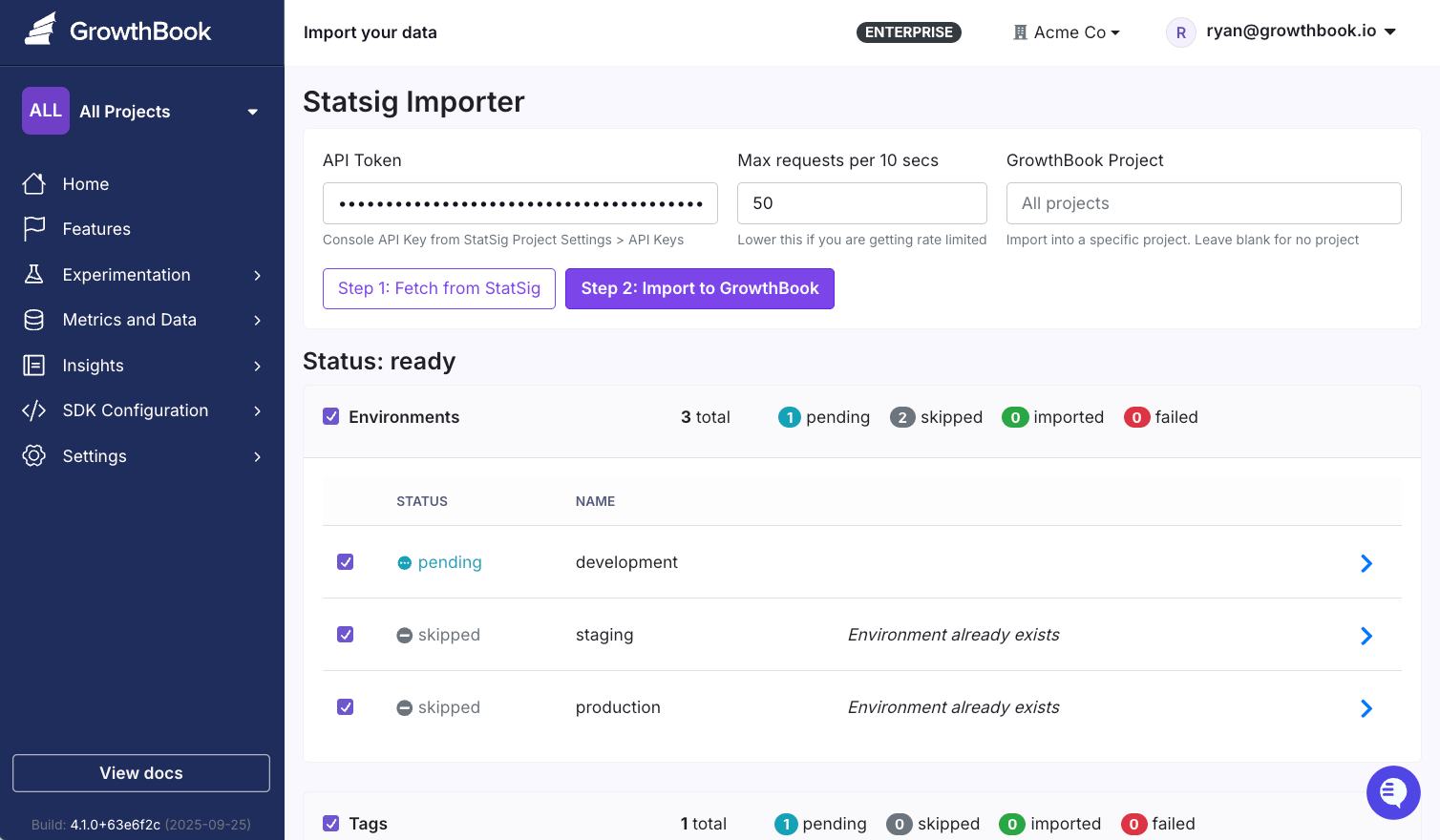
### Step 2: Run the Import
* In GrowthBook, go to **Settings** → **Import your data**
* Select Statsig
* Enter your Statsig Console API key
* Choose the GrowthBook project to import into, and select a Data Source if you want to import Metrics
* Click **Fetch from Statsig**
The import tool will retrieve:
* Environments (production, staging, etc.)
* Tags
* Segments
* Feature Gates
* Dynamic Configs
* Experiments
* Metric Sources (beta)
* Metrics (beta)
A few things do not come over automatically yet:
* Metrics and Metric Sources require a connected Data Source at import time, and only warehouse-native Statsig metrics are supported
* Imported experiments do not include their metrics or exposure query — assign those in GrowthBook after importing
### Step 3: Review and Confirm
Items will show as:
* **create**: New item that will be added to GrowthBook
* **update**: Item already exists in GrowthBook and will be updated
* **skip**: Item is unchecked and will be left untouched
You can:
* Uncheck items to remove them from the import
* Filter items by tag, or show only new or updated items
* Click the arrow (>) to view an item's Statsig definition and, for existing items, a diff against what's in GrowthBook
* Click **Import to GrowthBook** when ready
When the import status is marked as completed, your data is available in GrowthBook 🎉
## Migrate Your SDKs
**Automated SDK Migration**
Use our AI-powered migration assistant to automatically refactor your code from Statsig to GrowthBook SDKs.
**Supported SDKs**
* JavaScript
* Typescript
* React (client-side)
Looking for another language? Reach out to [support@growthbook.io](mailto:support@growthbook.io). We're happy to help!
### Installation
Download the subagent to your Claude Code agents directory:
```bash theme={null}
# Create the agents directory if it doesn't exist
mkdir -p ~/.claude/agents/
# Download the agent file
curl -o ~/.claude/agents/statsig-to-growthbook-sdk-migrator.md \
https://raw.githubusercontent.com/growthbook/claude-statsig-to-growthbook-sdk-migrator/main/.claude/agents/statsig-to-growthbook-sdk-migrator.md
```
### Using the Subagent
In Claude Code, simply ask:
> "I need to migrate this code from the Statsig SDK to the GrowthBook SDK: (@filename or directory)"
The subagent will:
* Convert import statements to GrowthBook SDK
* Transform feature gates to boolean flags
* Migrate dynamic configs to feature values
* Flatten `StatsigUser` objects to GrowthBook attributes
* Generate a migration report with any manual steps needed
🔗 See the [GitHub repo](https://github.com/growthbook/claude-statsig-to-growthbook-sdk-migrator) for more details.
## Terminology Mapping
| Statsig | GrowthBook |
| - | - |
| Segments | Saved Groups |
| Feature Gates | Features (boolean) |
| Dynamic Configs | Features (JSON) + [Configs](/features/configs) |
| Experiments | Experiments |
| Metric Sources | Fact Tables |
| Metrics | Fact Metrics |
A Statsig Dynamic Config maps to a GrowthBook feature flag with a JSON value. To get the typed, schema-validated side of a Dynamic Config, back the flag with a [Config](/features/configs) (Enterprise) — a reusable object that carries a value and a schema, which is enforced on any flag it backs. The import tool creates plain JSON features; attaching a config is a manual step afterward. For simple reusable values shared across flags, see [Constants](/features/constants).
## Next Steps
1. Test your imported features in a development environment
2. Assign metrics and an exposure query to your imported experiments
3. Configure webhooks and integrations
4. Review team permissions and access controls
Questions or issues? [Join our Slack community](https://join.slack.com/t/growthbookusers/shared_invite/zt-2xw8fu279-Y~hwnfCEf7WrEI9qScHURQ).
 ### Step 1: Generate a Statsig Console API Key
* In Statsig, go to **Settings** → **Keys & Environments**
* Create a new "Console" key with read-only permissions
* Copy the key (it starts with `console-`; server `secret-` and client `client-` keys will not work)
### Step 2: Run the Import
* In GrowthBook, go to **Settings** → **Import your data**
* Select Statsig
* Enter your Statsig Console API key
* Choose the GrowthBook project to import into, and select a Data Source if you want to import Metrics
* Click **Fetch from Statsig**
The import tool will retrieve:
* Environments (production, staging, etc.)
* Tags
* Segments
* Feature Gates
* Dynamic Configs
* Experiments
* Metric Sources (beta)
* Metrics (beta)
### Step 1: Generate a Statsig Console API Key
* In Statsig, go to **Settings** → **Keys & Environments**
* Create a new "Console" key with read-only permissions
* Copy the key (it starts with `console-`; server `secret-` and client `client-` keys will not work)
### Step 2: Run the Import
* In GrowthBook, go to **Settings** → **Import your data**
* Select Statsig
* Enter your Statsig Console API key
* Choose the GrowthBook project to import into, and select a Data Source if you want to import Metrics
* Click **Fetch from Statsig**
The import tool will retrieve:
* Environments (production, staging, etc.)
* Tags
* Segments
* Feature Gates
* Dynamic Configs
* Experiments
* Metric Sources (beta)
* Metrics (beta)