> ## Documentation Index
> Fetch the complete documentation index at: https://docs.growthbook.io/llms.txt
> Use this file to discover all available pages before exploring further.
# Command Palette
> Open the GrowthBook command palette with Cmd+K or Ctrl+K to jump to features, experiments, metrics, docs, or API endpoints.
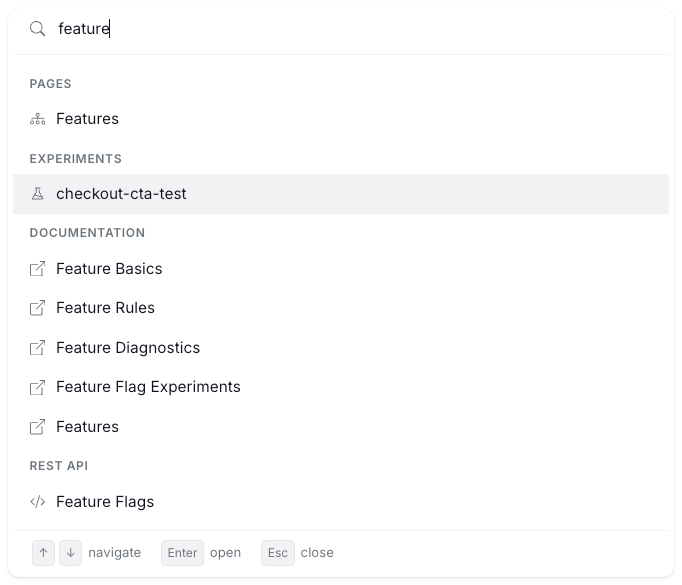
The command palette is a keyboard-first launcher for everything in GrowthBook. Open it from any page to jump straight to a feature, experiment, metric, dashboard, saved group, navigation page, doc, or REST API endpoint.
 ## Open the command palette
You can open it two ways:
* Press `Cmd+K` on Mac or `Ctrl+K` on Windows and Linux. The shortcut works on every page and toggles the palette open or closed.
* Click **Search** in the left sidebar.
Press `Esc` or click outside the palette to close it.
## What you can search
Start typing in the palette. Results group into the sections below, in this order:
| Section | What it returns | Where it sends you |
| - | - | - |
| **Pages** | Sidebar destinations you have access to | The page in GrowthBook |
| **Features** | Feature flags by ID and tags | The feature detail page |
| **Experiments** | Experiments by name, description, and tags | The experiment detail page |
| **Metrics** | Metrics, fact metrics, and metric groups by name, description, and tags | The metric or group page |
| **Saved Groups** | Saved groups by name | The saved group page |
| **Dashboards** | Product analytics dashboards by title | The dashboard page |
| **Documentation** | Sections of the GrowthBook docs | docs.growthbook.io, in a new tab |
| **REST API** | Endpoint groups in the public API reference | docs.growthbook.io/api, in a new tab |
Each section shows up to five results. If a section has more matches, a **Show N more…** row reveals the rest.
Archived features, experiments, and metrics aren't indexed. Deleted dashboards are also excluded.
## How matching works
Pages, docs, and REST API rows use strict matching, so short queries route precisely. For example, typing `exp` surfaces the **Experiments** page first.
Features, experiments, metrics, saved groups, and dashboards use fuzzy matching with smart tokenization. Identifiers are split on camelCase, kebab-case, and snake\_case boundaries before matching, so `myFeatureFlag`, `my-feature-flag`, and `my_feature_flag` all match the query `feat flag`. Queries with minor typos still match.
Results are scoped to your permissions and the current project. You only see pages and resources you can access.
## Keyboard shortcuts inside the palette
* `↑` and `↓`: move between results.
* `Enter`: open the selected result. Internal results open in the same tab. Documentation and REST API results open in a new tab.
* `Esc`: close the palette.
* Hovering with the mouse also moves the selection.
Use the palette as a fast way into the API reference. Type a resource name like `fact metrics` or `sdk connections` and press `Enter` to jump straight to that section of the [REST API docs](https://docs.growthbook.io/api).
## Open the command palette
You can open it two ways:
* Press `Cmd+K` on Mac or `Ctrl+K` on Windows and Linux. The shortcut works on every page and toggles the palette open or closed.
* Click **Search** in the left sidebar.
Press `Esc` or click outside the palette to close it.
## What you can search
Start typing in the palette. Results group into the sections below, in this order:
| Section | What it returns | Where it sends you |
| - | - | - |
| **Pages** | Sidebar destinations you have access to | The page in GrowthBook |
| **Features** | Feature flags by ID and tags | The feature detail page |
| **Experiments** | Experiments by name, description, and tags | The experiment detail page |
| **Metrics** | Metrics, fact metrics, and metric groups by name, description, and tags | The metric or group page |
| **Saved Groups** | Saved groups by name | The saved group page |
| **Dashboards** | Product analytics dashboards by title | The dashboard page |
| **Documentation** | Sections of the GrowthBook docs | docs.growthbook.io, in a new tab |
| **REST API** | Endpoint groups in the public API reference | docs.growthbook.io/api, in a new tab |
Each section shows up to five results. If a section has more matches, a **Show N more…** row reveals the rest.
Archived features, experiments, and metrics aren't indexed. Deleted dashboards are also excluded.
## How matching works
Pages, docs, and REST API rows use strict matching, so short queries route precisely. For example, typing `exp` surfaces the **Experiments** page first.
Features, experiments, metrics, saved groups, and dashboards use fuzzy matching with smart tokenization. Identifiers are split on camelCase, kebab-case, and snake\_case boundaries before matching, so `myFeatureFlag`, `my-feature-flag`, and `my_feature_flag` all match the query `feat flag`. Queries with minor typos still match.
Results are scoped to your permissions and the current project. You only see pages and resources you can access.
## Keyboard shortcuts inside the palette
* `↑` and `↓`: move between results.
* `Enter`: open the selected result. Internal results open in the same tab. Documentation and REST API results open in a new tab.
* `Esc`: close the palette.
* Hovering with the mouse also moves the selection.
Use the palette as a fast way into the API reference. Type a resource name like `fact metrics` or `sdk connections` and press `Enter` to jump straight to that section of the [REST API docs](https://docs.growthbook.io/api).